Scrapbooking Design Elements: Illustrations & Graphics Review
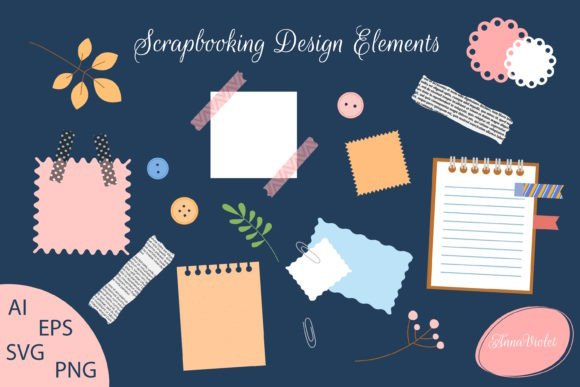
When I unzipped the Scrapbooking Design Elements folder for the first time, I was immediately evaluating it through the lens of a seller who needs assets to perform across multiple product types. The collection of isolated scrapbooking materials arrived with 16 AI, 16 EPS, 16 SVG, and 16 PNG files, which is a practical file spread that covers most digital product workflows I test. The visual personality leans toward a handmade, slightly rustic collage aesthetic with blank paper notes, newspaper clipping textures, botanical leaves, and decorative adhesive tapes that feel intentionally imperfect. This is not a polished minimal vector set. It has texture, layered edges, and a tactile quality that appeals to buyers searching for scrapbook materials with a genuine paper-crafted feel.
For Etsy sellers building digital download shops and print-on-demand creators designing merchandise, the mood of this graphic design asset sits comfortably in the journaling, memory-keeping, and vintage-inspired craft niche. The audience it attracts tends to be planners, memory keepers, card makers, and crafters who want elements that look like they were torn from a real scrapbook page. This is important because the perceived authenticity of the textures directly affects how a finished product photographs in a listing thumbnail.
How the Visual Personality Shapes Product Appeal
The blank paper notes and newspaper clipping elements carry a muted, warm-toned palette that reads as nostalgic without feeling dated. The leaf illustrations add organic shape contrast, and the decorative adhesive tapes introduce color accents that designers can use to build visual hierarchy in compositions. I spent time layering these elements on mockup backgrounds, and the combination of textures made even simple layouts look intentionally designed. That quality matters when you are selling a digital product like a printable journal kit or a Canva template where the end user expects a finished look with minimal effort.
From a branding perspective, the assets lean feminine, cozy, and slightly literary. This is useful for sellers whose shops target creative entrepreneurs, bloggers, and small business owners who use storytelling visuals for social media. A printable design featuring these elements would sit comfortably next to handwritten fonts, serif typography, and soft color palettes. The moood is decorative but not overly cute, which broadens the buyer demographic compared to strictly playful or childish clipart bundles.
Testing Across Product Types Before Publishing
Before I list any commercial design asset in my shop or use it inside a sellable product, I run it through a testing sequence that mirrors real buyer use cases. With Scrapbooking Design Elements, I started by opening the PNG files at 300 DPI and checking the transparency edges on the leaves and adhesive tape elements. The alpha channels were clean, which is critical for anyone creating sticker design sheets, sublimation design transfers, or layered Canva template projects where overlapping elements need to composite without white halos.
Next, I imported the SVG files into Cricut Design Space to test cut paths. The blank paper notes and newspaper clipping shapes had well-defined outlines that translated into smooth cutting lines. For a Cricut project creator, this is a make-or-break detail. Intricate leaves sometimes require node simplification, but the provided SVGs were surprisingly clean. I did notice that the decorative adhesive tape elements with torn edges produced more complex cut paths, which may slow down cutting on older machines. Sellers using these for SVG design bundles should note this in product descriptions to manage buyer expectations.
Product Mockup Scenarios for Marketplace Listings
I then built three quick product mockups to see how the illustrations performed in different selling formats. The first was a printable greeting card design where I paired a blank paper note backdrop with a single leaf accent and a script font sentiment. The composition looked balanced and required minimal adjustment, which is exactly what you want when batch-creating products for a creative marketplace like Etsy or Creative Fabrica. The second mockup was a t-shirt design where I used the newspaper clipping element as a textured background with a bold display font overlay. On a white garment mockup, the contrast was strong, and the graphic translated well into a print-on-demand context.
The third test was a digital planner sticker sheet, and this is where I had to be selective about which elements I used. The larger blank paper notes and adhesive tapes scaled beautifully, but the smaller newspaper clipping details lost clarity when reduced to thumbnail size. For planner stickers and tiny product previews, I would recommend using the broader shapes and reserving the more detailed elements for full-page printable products or social media graphics where the textures can be appreciated at a larger scale.
File Quality and Commercial Readiness
The 16 AI and 16 EPS files provide vector flexibility for designers who need to recolor, resize, or modify elements for brand identity projects and packaging design. I opened a few AI files to check layer organization, and the elements were logically grouped with editable paths. This matters for small business branding clients who may request color adjustments to match their palette. The PNG files are ready to use as drag-and-drop components in Canva or Photoshop, which makes them accessible to digital product creators who do not work with vector software.
One practical note on the newspaper clipping element: the text texture is rasterized and embedded, meaning it will not scale infinitely without potential quality loss. For large-format prints like tumbler wraps or tote bag prints, I recommend testing at the final print size before committing to a product line. The decorative adhesive tapes and leaves scale more predictably since they rely on shape rather than fine text detail.
Building a Seasonal Collection Around the Assets
Because the leaf elements have an autumnal, botanical quality, I can see a design bundle built around fall journaling, gratitude planners, and Thanksgiving-themed printable products. The blank paper notes and adhesive tapes provide a neutral base that seasonally adjusts when paired with different color palettes and typography. A seller could create a seasonal bundle using these scrapbook materials as the foundational rustic texture, then layer in seasonal accents and fonts to refresh the collection throughout the year.
For a digital download shop, grouping these elements into a themed product with coordinating papers and a font pairing guide increases perceived value. The isolated nature of each element means they combine well with other illustration sets, which is a selling point for buyers who want to expand their existing design toolkit without visual inconsistency.
Thumbnail Performance and Listing Presentation
I tested how the elements photograph in a thumbnail context by creating a mock listing image. The layered scrapbook aesthetic naturally creates depth, which helps listings stand out in crowded search results. A product mockup featuring these elements against a warm kraft paper background with a serif font title had strong visual hierarchy and communicated the handmade quality immediately. For Etsy product thumbnails, this layered look often outperforms flat vector graphics because it signals tactile craftsmanship.
When using the elements on dark backgrounds, I noticed the blank paper notes and some lighter adhesive tapes created a pleasing contrast, but the newspaper clipping element became harder to read. Sellers should preview all assets on both light and dark surfaces before finalizing listing images to ensure the details remain legible across different screen settings.
Commercial Licensing and Customer-Ready Files
Before integrating Scrapbooking Design Elements into sellable products, verify the commercial license terms. Most sellers using these for print-on-demand merchandise, Canva template shops, or design assets resale need clear commercial coverage. The ZIP folder structure with 16 files per format is organized, but I would rename the files descriptively before bundling them for customers. Clear file naming with terms like "blank-paper-note-01.png" or "leaf-botanical-03.svg" improves the customer experience and reduces support inquiries about file identification.
For handmade business owners who sell physical products at craft fairs, the SVG files cut reliably, and the PNG files print cleanly on cardstock for handmade card embellishments. The visual storytelling potential of these elements extends beyond digital products into physical craft inventory, which diversifies the ways a seller can monetize the asset.
Font Pairings That Enhance the Scrapbook Aesthetic
During testing, I paired the elements with several font categories to see which combinations produced the strongest brand consistency. A handwritten script font brought out the personal journaling feel of the blank paper notes. A clean sans serif font created a modern contrast against the rustic newspaper clipping. A classic serif font elevated the leaf elements into a more formal botanical print suitable for nursery prints or printable wall art. A bold display font worked well on mug designs and t-shirt graphics where the typography needed to read clearly over the textured backgrounds.
This font flexibility means the asset supports multiple visual hierarchy strategies, which is valuable for designers who create social media templates and blog graphics for clients across different industries. The scrapbook elements provide decorative framing without dictating a single stylistic direction.
Where the Asset Performs Strongest
Based on my testing, Scrapbooking Design Elements excels in full-page printable products, greeting card designs, invitation templates, digital scrapbook kits, and layered Canva designs where the textures can be appreciated at a reasonable scale. The elements work beautifully in product mockup previews and promotional visuals because the layered composition naturally draws the eye. For creative marketplace sellers building themed bundles around journaling, memory keeping, or botanical illustration, this set offers a cohesive visual language that simplifies product creation.
Cautionary Notes for Specific Use Cases
Use the smaller elements carefully in tiny sticker details where the fine newspaper clipping texture may blur. On crowded thumbnails with multiple competing elements, the subtle paper textures can lose their impact. For Cricut project creators, the adhesive tape elements with irregular torn edges produce more complex cut paths, so test on your specific machine before bundling them into a cutting file product. At low-resolution print settings, the rasterized text texture on the newspaper clipping may appear pixelated, so maintain 300 DPI minimum for print products.
When designing text-heavy templates, layer the scrapbook elements behind the typography rather than overlapping them, as the textured surfaces can reduce readability on small screens. For packaging design that requires precise registration marks, the organic shapes may need manual adjustment to align with strict print guidelines.
Final Assessment for Digital Sellers
After testing across multiple product types, Scrapbooking Design Elements proves to be a practical graphic design asset for sellers who understand its niche. It is not a universal clipart set, and it should not be marketed as one. Its strength is the authentic, slightly imperfect scrapbook aesthetic that resonates with a specific buyer demographic. For the right shop, whether that is a digital journaling brand, a print-on-demand stationery line, or a Canva template collection, the cohesive visual language and multi-format flexibility make it a reliable foundation for product creation. The 64 total files across four formats give sellers room to adapt the assets for SVG design, PNG design, and editable vector workflows without additional conversion steps.
Before publishing a product collection built around these elements, my checklist includes testing print colors on the paper I will recommend to customers, previewing thumbnails at the size they will appear in search results, verifying the SVG cut quality on the specific machine models my buyers use, and confirming that the commercial license covers the product types I intend to sell. These steps are standard for any commercial license asset, and skipping them is how sellers end up with customer complaints about cutting performance or print quality. The elements themselves are solid. The seller's preparation determines whether the finished products feel professional or rushed.